Agent Workbench: Run Your Coding Agents as One Team

Agent Workbench is now public. It is a set of skills and hooks for Claude Code and Codex that makes the session you talk to act like a team lead: it plans the work, hands pieces to cheaper Worker agents, and checks their results before it tells you anything is done.
It installs with one command and adds no app, server or dashboard:
npx @onsager/awb setup
The code is MIT-licensed on GitHub at onsager-ai/agent-workbench.
Why it exists
A single coding agent left to itself has a few habits that cost money and attention. It runs the most expensive model for a one-line fix. It forgets what you approved two hours ago. It commits straight to main, sits in a loop polling CI, and ends its turn with a question buried in the third paragraph of a status report. When the session runs out of context, the next one starts from nothing.
I wrote about the management side of this in How Do I Stop Babysitting My Agent?: an agent keeps turning around to ask when nobody has told it where its authority ends or what "done" looks like. And in the T3 Code post I described running more than a hundred agents through a handful of project-manager sessions. Agent Workbench is the set of rules that made that setup work, packaged so you can install it yourself.
How it works

The session you talk to is the Manager. It keeps the model you picked. Small questions and routine edits it handles itself. Substantial work it splits into pieces, writes a brief for each, and sends them to Worker subagents. Workers are your harness's own built-in subagents, so they inherit its permissions and sandbox, and independent pieces run in parallel.
The Manager checks before it reports. It looks at the real branch, commit and CI result, not just the Worker's summary. After two failed rework rounds it comes back to you instead of trying a third time.
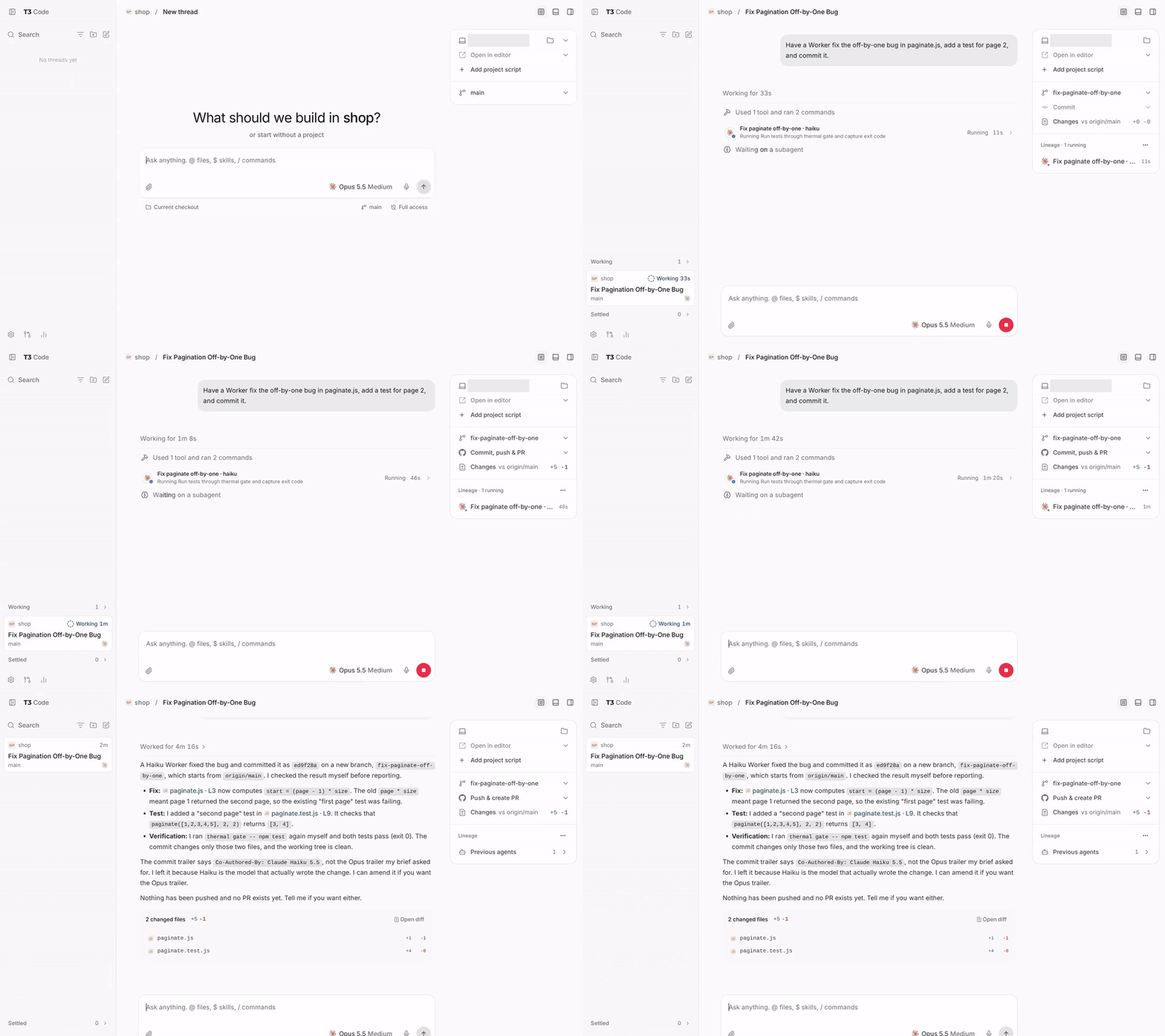
Here is a real Claude Code session after setup. The Manager hands an off-by-one fix to a Worker, then checks the diff, the commit and the tests itself before reporting:

What you get
The Worker ladder
Workers are picked from a three-level ladder:
| Level | Model | Used for |
|---|---|---|
| L1 | A fast, low-cost model | Bounded, well-specified work |
| L2 | A capable general model | Research, spikes, architecture |
| L3 | The strongest model | Only after you approve it for that task |
The Manager starts at the lowest level that fits the kind of task. Moving up needs a recorded reason, and L3 needs your OK every time.
Which model sits at each level is up to you. The mapping lives in one file, workers.yml, and any model can go at any level: Claude, Codex, or whatever a gateway such as Magpie or cc-switch routes to. If you switch providers often, an opt-in profile uses plain names (fast, standard, expert) so your config doesn't hard-code a vendor's model names.
Hooks that enforce the rules
Instructions alone drift. The rules that matter most are backed by a policy hook that runs on subagent dispatch, shell commands and turn end:
- No commits on local
main. Checking out, committing to or pushing a localmainormasteris blocked, so every change starts on a task branch. - Ask before expensive Workers. Dispatching an L3 Worker stops and waits for your approval.
- No CI polling. Commands like
gh pr checks --watchorsleeploops aroundghare blocked; the agent waits for the harness's own notifications. - Questions you can answer in one click. If the agent ends a turn with a question written as prose, it gets sent back to ask through the question tool, with its recommended option first.
Handoffs that survive
The Manager records what you asked for, what you approved, and which task owns what. A later session, or a session on another machine, can pick up the task from that handover note without repeating actions or asking you again. With T3 Code, Managers in different threads, harnesses or machines coordinate through T3 threads:
Host ops
If you run many agents on one machine, two extras help. awb ops thermal is an opt-in CPU temperature gate for Linux machines with a supported sensor: it holds heavy local work until the machine cools down. The host-ops skill gives agents rules for CPU-heavy work and for finding and reclaiming disk space.
How it compares
Most tools in this space run many agents side by side, ship a large catalog of prompts, or teach a development method. Agent Workbench does none of those. One Manager with a few Workers is deliberate: in Why AI Agent Teams Can't Escape the Mythical Man-Month I looked at research showing that adding agents to step-by-step work often makes it worse, because coordination grows faster than output. It is a thin rules layer on top of Claude Code's and Codex's own subagents, covering the parts they leave to you: which model to use, when to ask you, what to block, and how to hand a task over. It runs fine next to a parallel-session app such as Conductor or Claude Squad, since those manage terminals and worktrees, not model choice or approvals.
It is probably not what you want if you're after a step-by-step method like TDD (look at Superpowers), ready-made specialist agents (look at a catalog like wshobson/agents), or if you only use Cursor or Gemini CLI. The overview has the full comparison table.
Get started
-
Install the skills, Worker subagents and policy hook:
npx @onsager/awb setup -
If you use Codex, review and trust its hooks once:
awb trust -
Start a new session in Claude Code or Codex. That session is now your Manager. Give it a real task and watch what it delegates.
Setup writes only to your home directory and never to your repositories. Your own instructions and hooks stay in place, and awb uninstall restores what was there before. Setup doesn't install Claude Code or Codex or log you in; you need at least one of them already working.
The repo is at github.com/onsager-ai/agent-workbench, with a Chinese README. This is the first public release, so issues and pull requests are especially useful right now: tell me where the Manager delegated badly, where a hook got in your way, or which harness you want supported next.